01 / The visual direction
Include one chosen image, a named color palette or color codes, the silhouette you like, and the overall feeling: garden, romantic, boho, classic, or minimalist.
A wedding bouquet florist brief is a one-page reference that explains your desired palette, bouquet shape, flower preferences, and practical context. It helps you and your florist start with the same direction.
Written by Bouquet Studio · Planning guidance & labeled AI concepts
No account needed · one A4 page · use with your own florist
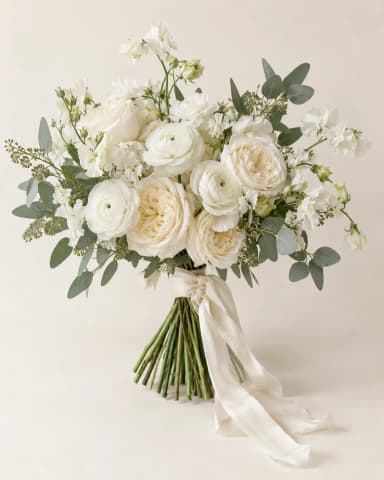
Ivory · Sage · Cream
SHAPE & STYLEHand-tied · Classic
FLOWER PREFERENCESRose
WEDDING MONTH / BUDGETTo discuss together
Visual concept. Confirm availability, substitutions, construction, practical size and pricing.
Your florist brief keeps the image and your requests together. A requested flower may differ from a flower shown in an AI image, so the written preferences help your florist understand what matters to you.
The personalized PDF records the settings used for that specific concept. Editing your studio controls later does not change an earlier concept’s brief. You can add or change the wedding month and budget separately.
| Option | What it includes | Access |
|---|---|---|
| Blank PDF template | One A4 page with spaces for your own visual reference, preferences, and practical details. | Free · no account needed |
| Sample PDF brief | A labeled ivory rose AI concept with example design settings to show the format. | Free · no account needed |
| Personalized PDF brief | Your saved bouquet concept and its design preferences, plus your notes, wedding month, and budget. | Sign in · paid design pack |
The free sample PDF uses the following starting preferences from our white rose wedding bouquet guide. Its image is an AI illustration of a direction. Wedding month and budget are left for you to discuss with your florist.
I like the ivory palette, layered rose texture, and softly gathered outline in this concept. Which flowers could preserve that feeling for my date and budget? Please advise on practical size, substitutions, and the final quote.
Example wording for your consultation; adapt it to your own priorities.
Include one chosen image, a named color palette or color codes, the silhouette you like, and the overall feeling: garden, romantic, boho, classic, or minimalist.
List your preferred flowers and the flowers you would like to avoid. Describe the texture you love if the exact variety is flexible. Requested flowers are preferences for your florist to confirm.
Add your wedding month, bouquet budget and currency. Visual volume is a relative appearance request; ask your florist to turn it into practical dimensions and a comfortable weight.
Ask about availability and substitutions, construction and care, a suitable real size, and the final quote. Your location, wedding date, supplier and chosen flowers all matter.
AI-generated visual concept for discussion. Your florist should confirm flower availability, substitutions, construction, size and final pricing. Requested flowers may not exactly match every flower shown.
Yes. The blank PDF template and sample brief on this page are free to download without an account. Fill in the blank template with your own flower preferences and practical details. A personalized PDF containing your generated bouquet concept is included with a paid design pack.
Send one main reference image, the colors and silhouette you like, preferred and avoided flowers, your wedding month, and your bouquet budget with its currency. Explain which details are essential and where you are open to alternatives. Confirm your exact date, location, and other practical arrangements directly with your florist.
No. It records your preferences, wedding month, and budget to support the discussion. Your florist should check flower availability and substitutions, recommend a practical size and construction, and provide the final quote. The AI concept does not guarantee a particular flower recipe or price.
Yes. In your personalized brief, the wedding month and bouquet budget can be updated separately. The image and design preferences remain tied to the saved concept: changing the generator controls later does not rewrite an earlier concept’s flower, color, or shape settings.
Start with a flower or color direction, then use its guide to decide which details you want to include in your brief.
Create a free watermarked preview. Choose Bouquet Starter or Bouquet Plus for additional designs. Both packs unlock your saved, unexpired preview, original images, and personalized PDF briefs. Repeat downloads do not use your remaining design count.
Imagine my bouquet Compare design packs