Choose flowers, colors & style
Pick a palette, bouquet shape, and up to three favorite flowers. Adjust the size, greenery, and ribbon, or start from a wedding bouquet idea below.
Turn your favorite flowers, wedding colors, and personal style into an AI bridal bouquet concept. See the possibilities before you meet your florist.
Generate my bouquet Your first preview is on us · No card neededBrowse wedding bouquet ideas 01 / timeless & tender
 02 / a blush kind of love
 Bouquet Studio is an AI wedding bouquet generator that turns your preferences into visual concepts. Start with a free preview; choose a pack when you want more designs and a florist brief.
Pick a palette, bouquet shape, and up to three favorite flowers. Adjust the size, greenery, and ribbon, or start from a wedding bouquet idea below.
Sign in and generate your first watermarked preview for free. With a paid pack, explore more directions and compare two saved bouquet designs side by side.
A paid pack includes original images and one-page PDF florist briefs. Add your wedding month and bouquet budget to discuss real flowers and substitutions.
Explore bridal bouquet ideas by flower and color.
Each guide includes a starting design and ways to personalize it.
AI CONCEPTThe timeless romantic. Ivory roses, a little sage green, and an effortless silhouette. A quietly beautiful starting point for a bouquet that never feels overdone.
AI CONCEPTA blush kind of love. Soft pink garden blooms, creamy layers, and a touch of green. For the romantic who loves a little softness and a wonderfully unstructured finish.
 AI CONCEPT
Wild at heart. An airy mix of meadow-inspired blooms in warm, earthy tones. Playful textures and a free-spirited outline, with room for the unexpected.
 AI CONCEPT
A little more drama. Rich wine-colored blooms balanced with dusty rose and muted green. Expressive and intimate, with depth that makes every petal feel special.
 AI CONCEPT
Simply, beautifully you. Sculptural ivory calla lilies and clean, graceful lines. An understated concept for a modern celebration, where a few beautiful details say everything.
 AI CONCEPT
Something softly sweet. Pastel tulips in powder pink, apricot, and lavender. A fresh, gentle direction with curved stems and the lovely feeling of a just-gathered bouquet.
From a color you love to a reference your florist can use.
Start with your wedding palette, then explore the balance of flowers, foliage, and ribbon. Choose a preset or add up to three custom colors to visualize your own combination.
Try blush pink, cream, and soft sage for a romantic direction.
Explore a blush bouquetExplore roses, peonies, ranunculus, tulips, calla lilies, hydrangeas, or a wildflower mix. Choose up to three favorites and flowers to avoid, then see how they work together in a concept.
Try calla lilies with minimal greenery for a sculptural direction.
Explore a calla lily bouquetChoose Garden, Romantic, Boho, Classic, or Minimalist, then adjust the shape, size, and greenery. A paid pack lets you generate more options and compare two saved concepts side by side.
Try a boho wildflower concept with an airy, gathered outline.
Explore a boho bouquetShare a visual reference and your flower, color, and style preferences. A paid pack includes a one-page PDF brief with room for your wedding month and bouquet budget, so your florist can suggest practical options.
Ask which substitutions preserve the look for your date and budget.
See the florist brief guideTry these four shapes in the generator. Size settings describe visual volume; your florist can confirm measurements and construction.
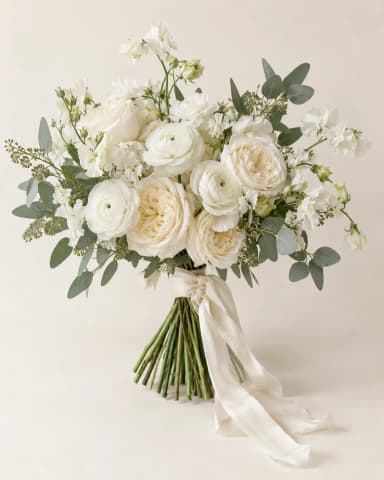
Hand-tied · Classic
FLOWER PREFERENCESIvory roses
YOUR BOUQUET BUDGETTo discuss together
AI visual concept. Flowers, availability and final pricing to be confirmed by your florist.
A bouquet is more than an image. Your florist brief brings the visual concept, your flower preferences, and your notes into one thoughtful page.
Add your wedding month and bouquet budget. Then let your florist guide the real flowers, substitutions, and finishing details.
Take a look at the florist briefYour first watermarked preview is free.
When you’re ready, make your ideas yours to keep.
No subscription. Failed designs are returned.
Free preview: 7 days · unlocked designs: 180 days.
Unused design counts do not expire. Applicable tax may be added at checkout.
What you can create, what is free, and how to turn a visual idea into a conversation about real flowers.
An AI wedding bouquet generator turns your flower, color, shape, and style preferences into a visual bridal bouquet concept. Bouquet Studio lets you explore a personalized image before discussing the real flowers with a florist. A design pack adds original image downloads, comparisons, and a one-page PDF florist brief.
Your first watermarked bouquet preview is free, with no payment card needed. Sign in to generate it. Original image downloads, PDF florist briefs, and additional generations require a paid design pack. The free preview is saved for seven days.
Choose a white and green, blush, pastel, burgundy, or sunset palette, or enter up to three custom colors. Use colors from your dress, bridesmaid outfits, or venue as a starting point, then adjust the flowers, greenery, and ribbon. The result is a visual color reference; confirm actual flower and fabric shades with your florist.
You can generate hand-tied, round, cascade, and posy bouquet concepts in small, medium, or large sizes. Try a hand-tied shape for a gathered outline, round for a compact silhouette, cascade for a trailing outline, or posy for a petite direction. AI size settings describe visual volume, rather than exact stem counts or measurements.
Yes. Select up to three preferred flowers from roses, peonies, ranunculus, tulips, calla lilies, hydrangeas, and a wildflower mix. You can also select flowers to avoid and add notes. These are AI generation preferences; individual flowers in the image can vary from your request.
It can help you explain the look you want. Add your wedding month and bouquet budget to the florist brief, then ask your florist which flowers and substitutions fit your date, location, and budget. Bouquet Studio does not check local stock, calculate real flower costs, or guarantee seasonal availability.
Your design is an AI-generated visual concept, not a physical bouquet. Take your image and florist brief to your florist to discuss the flowers, construction, substitutions, size, and final price.
Choose Bouquet Starter or Bouquet Plus on our pricing page for additional designs and to unlock your saved, unexpired preview. Both packs include original image downloads, personalized one-page florist briefs, side-by-side comparison, and design history. Each is a one-time purchase.
Yes. Choose your palette, bouquet silhouette, style, and up to three preferred flowers. You can also request flowers to avoid. AI results can vary, so the brief records your preferences for your florist to confirm.
Each new design is regenerated from your preferences. Changing a color, greenery, or size can also change other details. You confirm each generation before a design is used.
An unpaid preview is kept for seven days. When you unlock it, it is kept for 180 days from the first unlock. New paid designs are kept for 180 days from delivery. Download your favorites during that time. Purchased design counts do not expire.
Yes. Downloads and comparisons do not use a design. Your authorized images and briefs remain downloadable until their displayed expiry date, even if your remaining design count is zero.